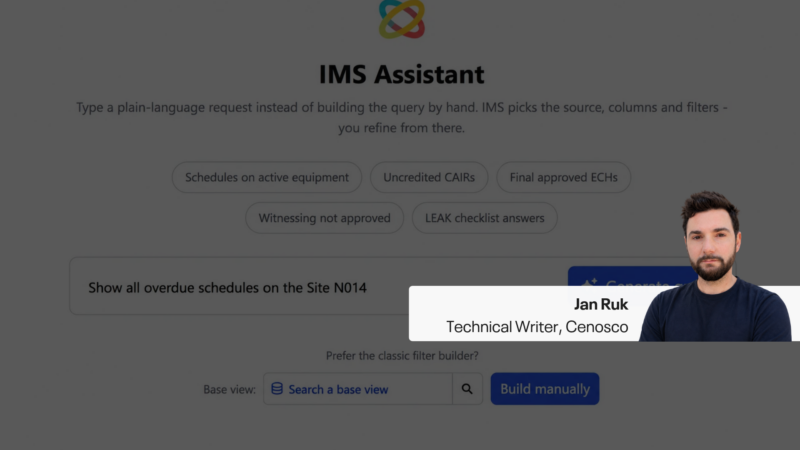
Inspectors, corrosion engineers, and planners usually know exactly what they need from their integrity data. Getting it out of the system is the slow part.
Building a query takes time that engineering teams rarely have. Every hour spent configuring a report is an hour not spent on inspection planning, assessments, or fieldwork.
IMS now addresses this with Conversational AI. The AI Query Builder is its first part: users type a question in plain language, and IMS builds the Custom Query for them. Natural language queries arrive with the November 2026 release, starting with the AI Query Builder.
Why Custom Queries Go Unused
The data model barrier
Custom Query can answer detailed questions about your integrity data. To build one by hand, you choose a base view, select fields, set filters, and sometimes join data. Power users do this quickly. Inspectors and junior planners who do not work with the data model every day often do not. For them, the query builder is a barrier, even when the question itself is simple.
Waiting on colleagues for every report
Without that background, users ask a power user or IT to build the query. The colleague pauses their own work, builds the report, and sends it back. Both people lose time. The requester waits for the answer, and the colleague spends engineering hours on retrieval instead of engineering.
Every new question restarts the cycle
Questions rarely end with the first result. A user sees the report and wants a narrower scope or a different site. Each adjustment goes back to a colleague, so the wait repeats even when the change is small. Small delays add up, because every new question restarts the cycle.
Natural Language Queries for Integrity Data
From question to query
With natural language queries, the user describes the data they need. IMS selects the base view, fields, and filters, and builds the query.
The user does not need to know which data source holds the answer. Inspectors can ask the question the way they would ask a colleague. The IMS Assistant start screen also suggests example prompts, such as schedules on active equipment, to help users phrase a first question.
The tool is built for inspectors, planners, and corrosion and reliability engineers. They know what data they need, but not the base views, filters, and joins behind it.
Refining results through follow-up questions
A follow-up changes the current query instead of replacing it. The user narrows or adjusts the result in the same conversation. The IMS Assistant panel keeps every earlier turn visible. The user always sees how the query reached its current state.
Why AI-generated queries must stay verifiable
Integrity data supports high-consequence decisions. An engineer must be able to see how the system interpreted a question and correct it if needed. IMS shows its interpretation, the base view, and the selected fields. The user can then edit the query in the same grid as a manually built one.
Your engineers already know the question. Conversational AI removes the step between the question and the data.
How Conversational AI Works in IMS Custom Query
Ask, refine, review, run
The AI Query Builder follows four steps:
- Ask: Select “Ask & build” in Custom Query to open the IMS Assistant panel, then type your question.
- Refine: Narrow or adjust the result with follow-up questions.
- Review: Check the base view, fields, and filters IMS selected, and open the editable grid to change them.
- Run: Use the result as it is, or save it for later.
A worked example: overdue schedules on Site N014

Start with a plain question: “Show all overdue schedules on the Site N014.” IMS builds the query on the Schedule main base view. It selects ten fields, applies two filters, and returns the matching schedules in the grid.

Then narrow it: “Only give me inspection schedules.” IMS keeps the existing query and adds a third filter for schedule type.

After each answer, the IMS Assistant panel lists the base view, the fields, and the number of filters applied. The user can check the interpretation without leaving the conversation. The table below shows both questions.

Hand-done, this sequence involves choosing the base view, adding 10 fields, and setting filters for site, overdue status, and schedule type. Here the user types two sentences. More complex queries need more fields and filters, so the time saved typically grows with complexity.
Built on the IMS data model, not a generic chatbot
The AI Query Builder works on IMS base views and fields. These cover asset integrity, rotating equipment, reliability, electrical, civil, flanges, instrumentation, and pipelines. A question that spans disciplines draws on the same data backbone. The user does not switch tools to ask it.
Unlike a general-purpose chatbot, the AI Query Builder works on IMS base views and fields, follows each user’s existing roles and permissions, and shows how it understood the question.
One page for building and viewing results
The redesigned Custom Query shows live results while you build. You manage columns in the grid and find fields with a searchable browser.
A normal Custom Query at the end
A generated query is a standard Custom Query. You can save it to a folder, add a description, and schedule a recurring Excel export. Existing saved queries and exports keep working.
Safeguards for High-Consequence Data
Integrity teams should expect four things from any conversational AI feature that touches inspection data:
- Permissions respected: Users see only the data their existing IMS roles allow.
- Interpretation shown: Every answer displays the selected base view and fields.
- Fully editable: Users can review and change any generated query.
- Manual builder available: The IMS Assistant start screen includes a “Build manually” option, and experienced users keep full control of the classic filter builder.
Every AI-generated query stays visible, editable, and within the user’s existing permissions.
Benefits for Integrity and Maintenance Teams
The main benefit is time. Engineers spend less of it retrieving data and more of it on the work that data supports. In practice, this works out differently for each role:
- Inspectors can pull inspection and CML data themselves, without waiting for a report.
- Corrosion engineers can check corrosion rate trends and adjust the question as they review results.
- Maintenance planners can find schedules and overdue work without asking a power user to build the query.
- Integrity managers can get a status view quickly, and they can share the saved query so the team analyzes data the same way.
Power users benefit too. They can use a generated query as a starting point and refine it manually, which is usually faster than starting from an empty grid.
Getting Started with the AI Query Builder
To bring natural language queries into your team’s daily work, start with the questions your team already asks:
- List the recurring questions your team asks about integrity data.
- Ask one of them in plain language in Custom Query.
- Refine the result with follow-up questions until it matches what you need.
- Review the base view and fields in the grid.
- Save, share, or schedule the query.
Availability and Current Limitations
Conversational AI arrives with the November 2026 release as an open beta, and the IMS Assistant carries a Beta label in the interface. It runs on Cenosco-hosted IMS instances. On-premises customers can request it through Sales and Product Technology, because it is not enabled for them by default.
Two limits apply at launch. The AI Query Builder supports English only, and it answers questions that Custom Query can already answer. The manual query builder remains fully available alongside it. Cenosco plans to extend conversational analysis to more areas of IMS over time.
See Cenosco AI Query builder in action.
Check out how the AI Query Builder works in IMS, request a demo!

Jan Ruk Technical Writer
Jan is a Senior Technical Writer focused on creating, managing, and improving technical documentation processes. He enjoys research, optimizing workflows, and finding ways to improve content quality and efficiency. He holds a Master’s degree in English and Spanish Language and Literature. Outside of work, he enjoys reading short stories, traveling, and hopes to visit Iceland, Japan, and Bolivia one day.